The Atlas: look anything up
One place for everything Waypoint Realms knows — learn-to-play guides, the comics tree, and the anime tree.
The Atlas is where Waypoint Realms keeps what it knows. It sits in the top navigation next to Messages, outside the Realms, because looking something up is not something you do inside one Realm — a character, a series, and a set of game rules are all the same kind of question.
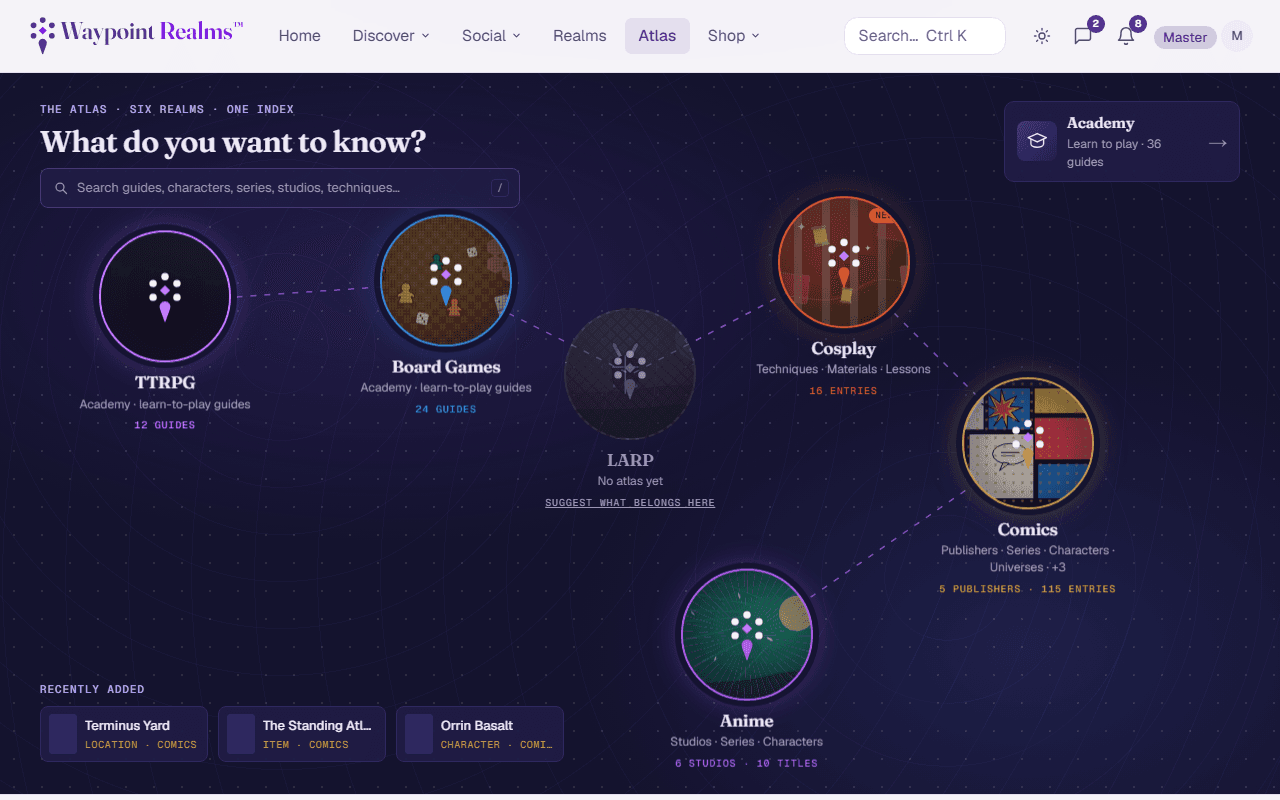
The hub
The Atlas opens on a map of all six Realms. A Realm with a collection shows what is in it — how many publishers, studios or guides — and takes you there. A Realm without one is dimmed and says No atlas yet, with a link to tell us what belongs there. The Academy is pinned beside the map rather than placed on it, because it serves two Realms at once: the TTRPG and Board Games waypoints both lead into it, filtered to their own guides.
What's in it
The Atlas is organised into collections:
- Academy — learn-to-play guides for board games and tabletop RPGs. What a game is, how it works, and how to win.
- Comics — publishers, their universes and series, and the characters, teams, locations and items inside them.
- Anime — studios, franchises and titles, plus the cast across every catalogued show.
More collections open over time, and the bar under the header always lists the ones that are open. Inside a collection that bar is how you move between them; the tabs under the title are that collection's own sections. On a phone the tabs scroll sideways and a Sections button at the foot of the screen opens the full list with counts.
An entry page — a character, a series, a guide — brings back the left rail instead, because that is the page you read one of and then go looking for the next.
Finding things
The search box on the Atlas landing searches only the Atlas, so you get guides and characters rather than sessions and venues. On the results page you can widen back to everything, or narrow to a single collection, using the scope chips above the results.
The site-wide search covers the Atlas too — this is just a faster way in when you already know you want reference material.
Both directions
Where things moved
The Academy used to live at its own top-level link, and the Comics and Anime codexes each sat inside their Realm. They are all in the Atlas now. Old links and bookmarks still work — they redirect to the new locations, so nothing you saved is lost.
A collection that is not open yet
Curated, not crowd-sourced
Suggest a correction or an addition
Spotted a wrong fact, a missing character, or a series filed under the wrong universe? Every entry and every empty collection has a Suggest an edit link that brings you here. Send the details as a feedback request — name the page, what is wrong or missing, and a source if you have one. The team reviews each one and updates the Atlas; you will get a reply in your support inbox.
Still stuck? Browse all help or contact us. To report someone or something, use the report action on the relevant profile, post, or session — it sends us the context automatically.