The Comics Realm
Track your collection and pull list, read comics published here, make or publish your own, and find collaborators.
The Comics Realm covers three habits: keeping track of a collection, reading comics, and making them. They are separate tools on purpose.
Early access
Your library
The Comics Library is your own shelf: series you want, are reading or have read, what you own, your rating, and your notes. Nothing here is public unless you choose to share it; a shared series shows on Discover with your name, and members under 18 are only ever shown to their friends. Link a series to the Atlas and its issues appear on the series page, where you can mark each one owned or read, rate the issues you have read, and review the series.
Each issue has its own page. There you can record the copies you own — which variant cover, which printing, the format, and for a graded book who graded it, the grade and the certificate number, and keep a private note on the issue. Only you can see your copies and notes.
Catching up on a long run? On a series page, use the ⋯ beside an issue to mark everything up to it as read or owned. The page also lists the holes in your run — the issues you are missing between the first and last ones you own.
Your year in comics adds up what you marked read: issues by month, your most-read series and creators, and the runs you finished — with a card of the totals you can download and share. Only you can see the page.
Under your library, Recommended for you suggests series that share creators, characters or readers with what is already on your shelf — and says which.
Coming from CLZ Comics or League of Comic Geeks? Export your collection as a CSV there and use Import a collection. You see what matched before anything is saved, imported series are private unless you choose otherwise, and series already on your shelf are left as they are.
The Atlas
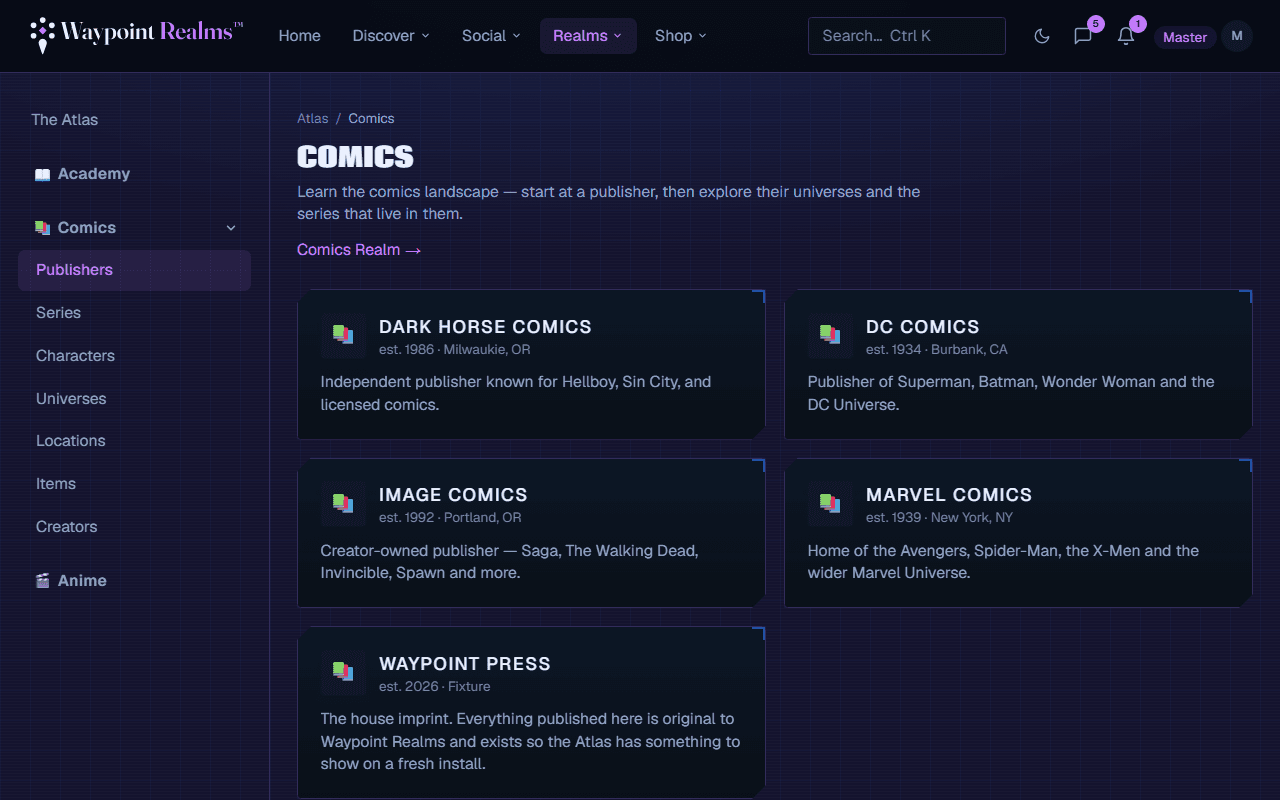
The Comics Atlas is a hand-curated reference: publisher → universe → series, with entries for the characters, teams, places and things inside them. It answers “where do I start with this?” and “who is this and why does everyone care?”
It is readable without an account, which is deliberate — someone searching for a series should be able to land on it and read. Where an entry draws on an outside source, the page credits that source and links to it. Spotted something wrong? Use Suggest an edit on the entry.
Arcs & events are reading orders: the issues of one story, across however many series it runs through, in the order to read them — with your own read marks and where to pick up.
Follow a series, a creator, a character or an arc to be told when a new issue comes out — of that series, by that creator, in a series that character appears in, or in that arc. You get one alert per issue, however many of the things in it you follow.
New Comic Day
Add series to your pull list and New Comic Day shows what ships this week and next. You get a reminder when new issues land, following your notification settings. The same page lets you download the release dates as a calendar file, or subscribe to a private calendar link that keeps itself up to date.
The Bindery: reading comics here
The Bindery is where comics published on Waypoint Realms are read. Browse the catalog, open a title, and read page by page or as a vertical scroll — right-to-left books read right-to-left. Your place is saved and follows you between devices.
To read without a connection, choose Download beside a chapter on its title’s page. Your downloads are on Downloaded comics, which opens even when you are offline. A download stays encrypted in that browser and opens only there. It lasts 30 days, and it checks in at least every 7 days while you have a connection: if your access to the chapter ends, the download stops opening at the next check-in. Signing out removes your downloads, and you can sign a browser’s downloads out from your comics settings.
Every title carries a rating and content warnings. Choose the highest rating you want to see, and any warnings to hide, in your comics settings. Members under 18 — or who have not given a birthdate yet — do not see titles rated 16+, and never see Mature ones.
Making and publishing comics
You can build a comic in the Comic Studio — panels, art you upload or draw, balloons, captions and sound effects — or upload a finished file (CBZ, CBR, PDF or fixed-layout EPUB) in the publishing console. Either way, you first set up a publishing identity and accept the Comics Publisher Agreement. If the agreement changes, the console asks you to accept the new version before you publish anything new.
You can also schedule a chapter: pick a date and time and it goes out then (once its review is done), and everyone who pulls the title is told. Readers who pull it see the date on their New Comic Day.
Every chapter is checked automatically before it can be published, and while the catalog is young every chapter is also reviewed by a person. That usually takes about a day; you are told when it is done.
The Collab Board
Writers looking for artists, artists looking for colourists, anyone looking for a letterer. Post what you are making and what you need, or answer someone else's. Projects keep a team: the owner invites people by username, or approves a request to join, and nobody joins a project without both sides agreeing. It is a noticeboard, not a jobs marketplace — money is between you.
Reporting a comic
Use Report on a title, under a chapter, or on a Collab Board listing to send it to our moderators. If a comic uses your copyrighted work, file a copyright notice instead — you do not need an account.
What is not open yet
Paid reading — subscriptions, buying individual titles, and paying creators — is not open yet. Until it is, comics on Waypoint Realms are free to read.
Still stuck? Browse all help or contact us. To report someone or something, use the report action on the relevant profile, post, or session — it sends us the context automatically.